Here's our free quote template for UK trades. Download it in Word to fill in on your computer or phone, or as a PDF to print and fill in by hand. There's no sign-up and no email to give. It has a place for everything a quote should say, including the 14-day cancellation notice and form you need when a homeowner agrees the job at their home, by phone or online.
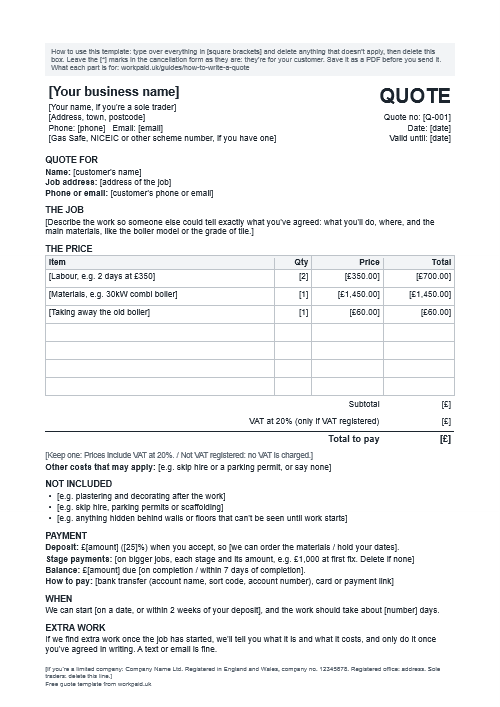
This is a template for trades working in the UK, not legal advice. It follows the law in England and Wales; contract law in Scotland differs in places.
What's on it
- Who you are: your business name, your own name if you're a sole trader, your address, phone and email, and any scheme number like Gas Safe or NICEIC. Limited companies get a line at the bottom for the company number and registered office.
- The quote's details: a quote number, the date and a valid-until date.
- Who it's for: the customer's name and the address of the job.
- The job: room to describe the work so a stranger could tell what you agreed.
- The price: a table for each item, then the subtotal, VAT if you're registered, and the total to pay.
- Other costs and what isn't included: the skip, the making good, anything you can't see yet.
- Payment: the deposit and what it's for, any stages, the balance and how to pay.
- Timing: when you can start and roughly how long it'll take.
- Extra work: a line saying extras are priced and agreed in writing before you do them.
- Guarantee and problems: what you guarantee, and who to contact if something goes wrong.
- The right to cancel: the 14-day notice, and the official cancellation form on its own page.
- How to accept: reply "I accept", or sign and send a photo.
Why each part is there, and what the law asks for, is in our guide to how to write a quote.
Filling it in
- The Word version: type over everything in [square brackets] and delete what doesn't apply. The grey box at the top says the same: delete it too before you send.
- VAT: if you're VAT registered and the customer is a homeowner, the total they see must include the VAT. If you're not registered, keep the line that says so and delete the VAT row.
- The deposit: put the amount and what it's for, like "so we can order the boiler". How much to ask for: how much deposit should you ask for.
- Valid until: 30 days is common. Keep it shorter when material prices are moving.
- The right to cancel: keep that section and the form if the customer is a homeowner and you agreed the job at their home, by phone or online. Delete both for business customers. The rules are in the 14-day cooling-off rule.
- The cancellation form: leave the [*] marks as they are. It's the official wording, and the customer crosses out what doesn't apply.
- Sending it: send a PDF, not the Word file. In Word, choose File, then Save As, then PDF. In Google Docs, choose File, then Download, then PDF.
With WorkPaid: send the quote as a link instead. Your customer accepts by typing their name and pays the deposit on the same page. Already filled in this template? Once you've set up payments, upload the PDF or a photo of it and WorkPaid fills in the quote for you to check. It's free to send quotes, with no monthly fee. Get started free.
Using it on paper
Print the PDF and fill it in by hand. Tick whether your prices include VAT, and which day the customer's 14 days run from: the day after they accept for a fitting-only job, or the day after the goods arrive for supply and fit. Keep a photo of every quote you hand over, and of the signed copy when it comes back.
Three questions we get asked
Is the quote template really free?
Yes. Download it, change it and use it as often as you like, with no sign-up. You can delete the small line at the bottom that says where it came from.
Do I need the cancellation form on every quote?
You need it when the customer is a homeowner and you agree the job at their home, by phone or online. The law says they must get the cancellation information and a form in writing before they commit. For business customers, delete that section and the form.
Should I send a quote as a Word file or a PDF?
A PDF. It looks the same on every phone and nobody can change it by accident. Fill in the Word version, then save it as a PDF to send.
Doing it in WorkPaid
If you'd rather not fill in a template every time, WorkPaid's quoting app has the same parts built in. You add the work line by line, with VAT added for you if you're registered, then the deposit or stages, a valid-until date and your cancellation notice, which you can save in your profile so it's on every quote.
You send it as one link. The customer reads it on their phone, accepts by typing their name and pays the deposit from the same page, and WorkPaid keeps who accepted and when. It's free to send quotes, with no monthly fee. When a customer pays you through WorkPaid, our fee is 2.5%, capped at £500 a quote, plus the processing, as on a card machine.
Where this comes from: the cancellation form is the model form in Schedule 3 of the Consumer Contracts Regulations 2013, and the rest follows Schedule 2 (what you tell a customer before a job agreed away from your premises) and GOV.UK on what a limited company shows on its paperwork. Our guides to how to write a quote and the 14-day cooling-off rule explain each part.